
Muse
Plans the job in Meta's cloud and calls six tools on the device. It works only with tags and summaries.
A Muse connector for hardware you own. Your device reads the records, tags every name and decides what Muse gets back.
Status, Oct 29: the whole path runs on a laptop with invented data, and 1,740 tests pass. The Muse app paired with it on Oct 28.
A private workspace for Muse.
Your documents and models stay on your device.
git clone https://github.com/Offline-Base/muse-privacy
cd muse-privacy && uv sync && uv run python -m base
git clone https://github.com/Offline-Base/muse-privacy
cd muse-privacy && sudo deploy/jetson/install.sh --build-llama
Plans the job in Meta's cloud and calls six tools on the device. It works only with tags and summaries.

Every model step runs on your laptop: finding names, reading who a request is for, search and summaries. Your own rules, not a model, decide what can be shared.

Wrote the 2,000 invented practice items and graded the tagged essays a second time. Never used for user data.

Used for the earlier benchmarks below, on OpenRouter with invented data. It is not part of today's device-only setup.
Everything inside the dashed line happens on your own device. Muse only gets what passes your rules and the final check, as tags. Pick an example to watch one go through.
Exact checks swap every roster name, nickname and identifier for a tag before any model reads the text. Letters are shuffled on each device, so a tag says nothing about the name.
Every result passes the same steps: tag names and identifiers, a name pass, who it is for, the privacy router and a final leak check. If a check cannot run, the result stays on the device.
When the router asks, a card waits on an approval page only your machine serves, and Muse hears "Waiting for your OK on the device." Never-share topics are kept without asking.
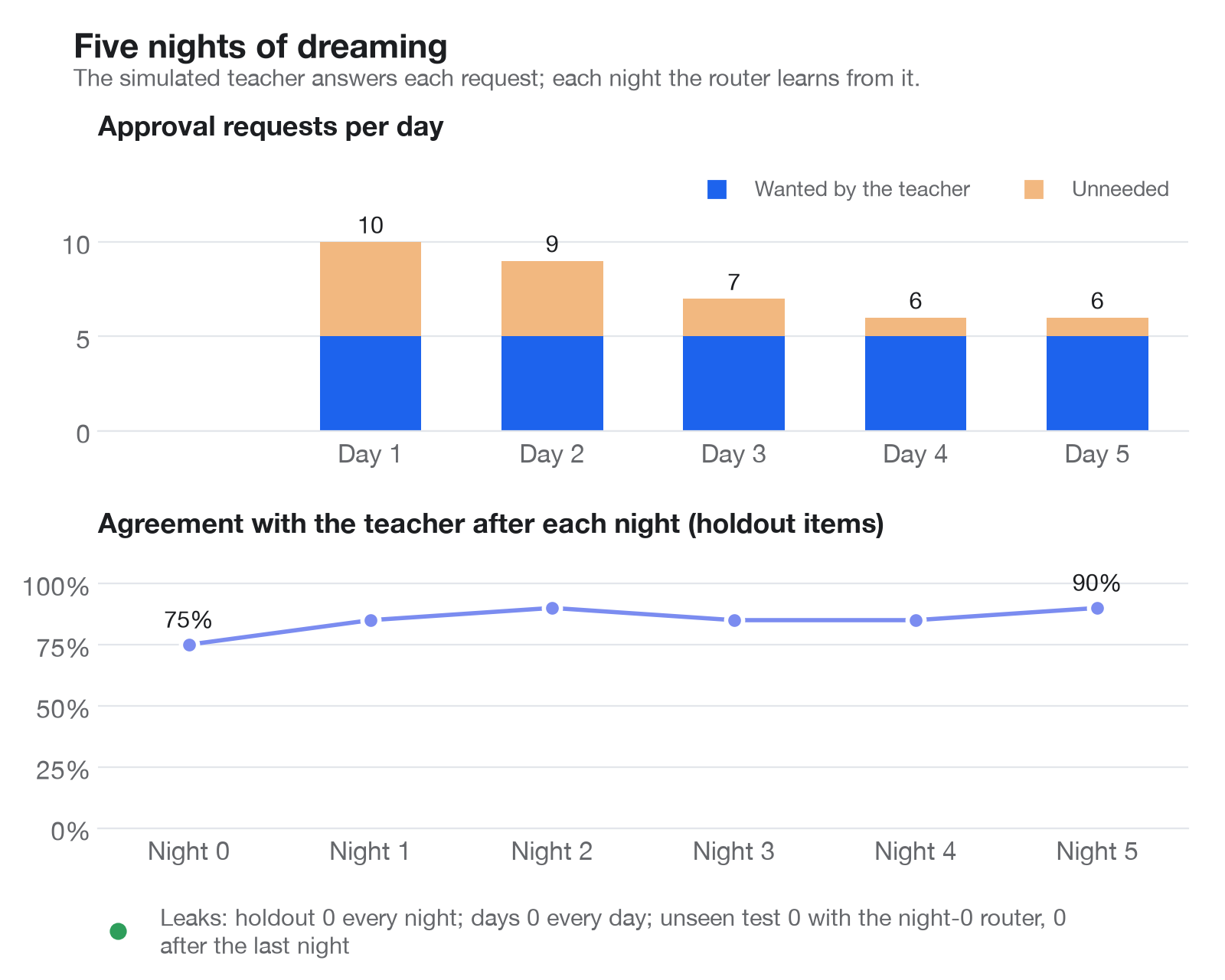
The device rebuilds the router's rules from your approve and deny answers and keeps them only if they score no worse on a holdout set, with zero leaks.
With device-only mode on, no model is reached off your laptop. If the local model is down, results wait on the device. Only tagged results go to Muse, and each one gets a receipt.
Fifteen toggles in six groups: students and children (FERPA, COPPA, state laws), health (HIPAA, 42 CFR Part 2), money (GLBA, PCI DSS, tax preparer rules), work (attorney-client, employee records), privacy laws (GDPR, CCPA) and government (CUI, CJIS, ITAR and EAR). Each tags more, locks the settings that could undo it, and holds results it should. The government ones send nothing to Muse at all. A toggle doesn't make anyone legally covered: your school, clinic, agency or company still decides whether Muse may be used.
The results in these demos come from the earlier Muse Glimmer runs. Every student, guardian and record here is invented, and the tags are the guard's real output on one laptop. The field trip form, the scores, the class summary and the job ids are examples. The search example replays that laptop's decision log from the Muse app session on Oct 28. Sequences are shortened throughout.
Who it's for
Muse can already reach your files through connectors, but whatever it reads lands in its cloud VM, names and all. That keeps it away from the private, tedious work most ready for automation: grading student papers, medical records, city agency casework.
Grading and feedback, the job this build automates, has a student's name in every file. Under FERPA's school-official exception, a school may give education records to an outside service without parent consent only if, among other conditions, the service is "under the direct control of the agency or institution with respect to the use and maintenance of education records."
US Department of Education, FERPA FAQ
Here the essays stay on the teacher's laptop, and the feedback files with real names are written only there.
Anywhere records have to stay with whoever holds them: a clinic's charts, a caseworker's files. Muse plans with tags, and the device does the reading.
What never leaves is set in one policy file of topics and rules. In the classroom policy, health details, home addresses and parent contacts never leave.
It installs on a laptop today. A Jetson Orin Nano box is the version a school could own outright, with a status light for working, waiting for your OK and sending to Muse.
The Jetson path is designed and tested in simulation, not run on a board yet. Built solo by Ethan, who builds AI tools with school districts.
Today's setup runs every model on the laptop, and the first two numbers measure it on invented students. The rest are earlier measurements with Muse Glimmer on OpenRouter, which is not part of today's setup.
The laptop numbers are from one day of invented data, with no real class and no outside review. Grading and nightly learning have not been measured on the local model, and nothing has run on a Jetson in this setup.
On Oct 28 it paired, listed the six tools, listed the workspace and ran a search through the relay. Grading, approvals and the scheduled jobs have run only with a script playing Muse.
The roster can't know siblings, guardians or staff, so the device also uses a name-shape check and the local model. A name written in lower case and missed by the model is not caught.
Whatever you type into Muse reaches Meta before the device sees it. Meta's training setting is on by default, so the setup page asks you to turn it off, and Prepare a question tags your question first.
It asked about 21 of 25 results the simulated teacher would have shared tagged.
On the unseen test it stopped asking about 8 of 25 items she wanted to see first. They went out tagged, so they are not leaks, but they are policy misses.
The teacher is a policy file, and the rules are chosen on the holdout, so its 90% is an upper bound.
Get started
Needs llama.cpp and the LFM3-VL-2B model on your laptop. One command starts everything, and a setup page does the rest.
git clone https://github.com/Offline-Base/muse-privacy
cd muse-privacy && uv sync
cp .env.example .env  # set DEVICE_ONLY=1
uv run pytest -q
scripts/start.sh
relay/ with its deploy script./mcp address, with OAuth.Designed and tested in simulation, not run on a board yet. The installer builds llama.cpp, fetches an about 1.6-bit (IQ1_S) Muse Glimmer and sets up three services.
sudo deploy/jetson/install.sh --build-llama
sudo systemctl start \
  muse-privacy-glimmer muse-privacy